
Custom Domain
Use a custom domain so players open your games and streams on a branded hostname — for example
https://play.acme.com instead of https://app.dailyplay.ai.
What You Get
Section titled “What You Get”When a custom domain is active for your organization:
- Play and stream links can use your hostname
- DailyPlay provisions SSL and routing automatically
- You only manage DNS at your domain provider
Apex / naked domains are not supported. Use a subdomain such as play.acme.com or
games.brand.co.uk — not acme.com.
Prerequisites
Section titled “Prerequisites”| Requirement | Details |
|---|---|
| Access enabled | Custom domain feature turned on for your organization after support approves your request |
| Organization Owner or Admin | Only roles that can edit organization settings can save the domain |
| DNS access | Ability to create a CNAME (and optional TXT) record for your subdomain |
Request Access
Section titled “Request Access”- Open Support in the DailyPlay app and submit a request, or email support@dailyplay.ai
- Include:
- Your organization name
- The subdomain you want (for example
play.yourbrand.com)
- Wait for confirmation that custom domains are enabled for your organization
You will not see the Custom domain settings until access is granted.
Set Up Your Domain
Section titled “Set Up Your Domain”Once access is enabled:
- Go to Organization → Settings
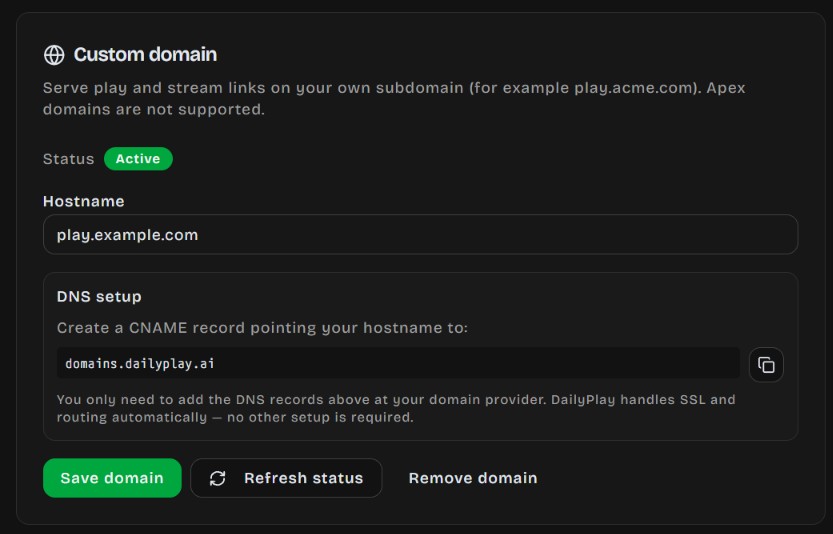
- Find the Custom domain section
- Enter your hostname (for example
play.acme.com) — do not includehttps://or a path - Click Save domain
- Create the DNS records shown in the app (see below)
- Click Refresh status until the status shows Active
After you save, status often shows Pending DNS / SSL until DNS propagates and SSL is issued.
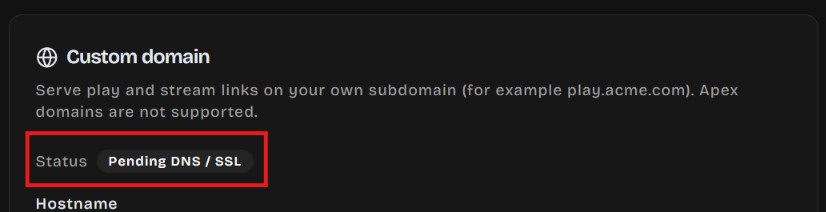
DNS changes can take a few minutes to several hours to propagate, depending on your provider.
DNS: CNAME record
Section titled “DNS: CNAME record”Create a CNAME record at your DNS provider:
| Field | Value |
|---|---|
| Name / Host | Your subdomain prefix (for example play for play.acme.com) |
| Target / Points to | domains.dailyplay.ai |
The exact CNAME target is also shown in Organization Settings — copy it from there if it differs.
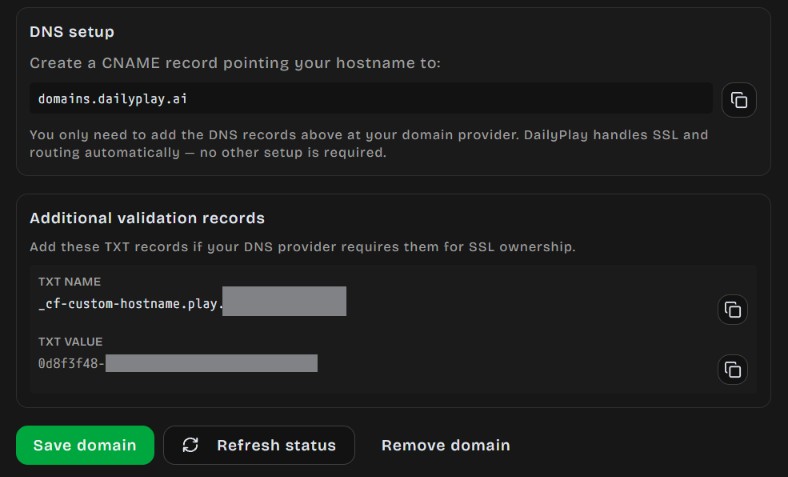
Additional validation records (if shown)
Section titled “Additional validation records (if shown)”Some DNS providers require extra TXT records for SSL ownership verification. If the app shows Additional validation records, add each TXT name and value exactly as displayed, then refresh status again.
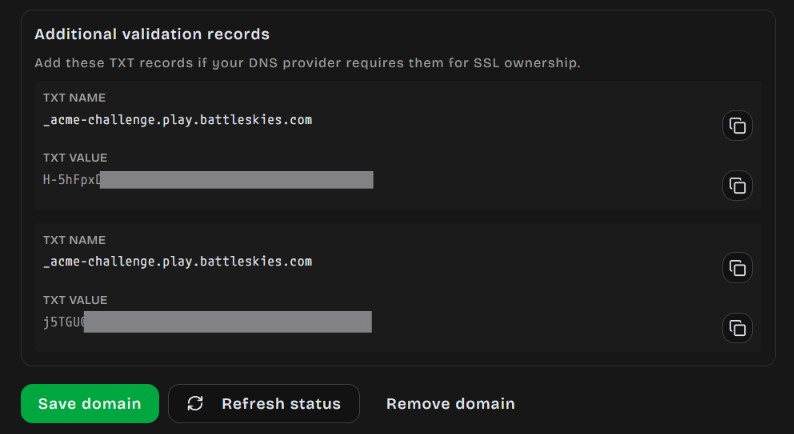
Status Meanings
Section titled “Status Meanings”| Status | Meaning |
|---|---|
| Not configured | No hostname saved yet |
| Pending DNS / SSL | Waiting for DNS to propagate or SSL to issue |
| Active | Domain is live — play and stream links can use it |
| Needs attention | Check DNS records and refresh; contact support if it persists |
| Moved / Deleted | Domain was moved or removed — reconfigure or contact support |
After It Is Active
Section titled “After It Is Active”- Share play and stream URLs using your custom hostname
- Existing
app.dailyplay.ailinks continue to work - To change the hostname, update it in Organization Settings and adjust DNS accordingly
- To remove it, use Remove domain in Organization Settings and delete the related DNS records
Troubleshooting
Section titled “Troubleshooting”Custom domain section is missing
Section titled “Custom domain section is missing”Access has not been granted yet. Request it via in-app support or support@dailyplay.ai.
Status stays Pending
Section titled “Status stays Pending”- Confirm the CNAME points to
domains.dailyplay.ai(or the target shown in the app) - Wait for DNS TTL to expire, then click Refresh status
- Add any TXT validation records shown in the app
- Avoid proxy/CDN settings that rewrite or block the CNAME unless your provider documents support for this setup
Apex domain rejected
Section titled “Apex domain rejected”DailyPlay only supports subdomains. Use play.yourbrand.com, not yourbrand.com.
Wrong site or SSL errors
Section titled “Wrong site or SSL errors”- Ensure only one CNAME for that hostname points at DailyPlay
- Remove conflicting A/AAAA records on the same hostname
- Contact support if the status is Active but players still see errors