
Prize Configuration
Lucky-draw games (Spin the Wheel, Gachapon, Grid Box, Scratch Card, Card Pull, and Claw Machine) use a prize configuration system. This guide explains how to set up, manage, and monitor prizes.
Prize Types
Section titled “Prize Types”Each prize slot must be one of six types:
| Type | What the player gets | Fulfillment |
|---|---|---|
| Voucher Set | A unique code pulled from a managed set | Automatic (tracked) |
| Voucher | A fixed code string (e.g., “SAVE20”) | Shown directly to player |
| Item | A named physical/digital prize | Manual (you fulfill) |
| External Link | A URL where the player redeems separately | Player follows link |
| Custom Voucher | A code issued by an external provider | Automatic via webhook (your system) |
| No Prize | “Try again” — no reward given | N/A |
When to use each type
Section titled “When to use each type”- Voucher Set — Best for campaigns with many unique codes (one per winner). Codes are auto-assigned from your inventory and tracked.
- Voucher — Use for a single shared code that all winners see (e.g., a universal discount code).
- Item — Physical merchandise, free products, or service upgrades that require manual fulfillment.
- External Link — Drive traffic to a landing page, partner offer, or redemption portal.
- Custom Voucher — Best when your codes live in another platform (e.g., an e-commerce store or loyalty system). DailyPlay requests a code from your provider at claim time via a webhook, so inventory stays in your own system.
- No Prize — Essential for balancing probabilities. Without “try again” slots, every play results in a win.
Custom Voucher (Webhook-Connected)
Section titled “Custom Voucher (Webhook-Connected)”The Custom Voucher type delegates fulfillment to an external provider. Instead of pulling a code from a DailyPlay voucher set, the player’s claim triggers a webhook to your provider, which returns the real code. Use this when your codes are managed outside DailyPlay.
Provider vs. Connection
Section titled “Provider vs. Connection”There are two layers behind this prize type:
| Layer | What it is |
|---|---|
| Provider | A template that defines what fields the provider needs and how its webhook is shaped (e.g., a store integration). |
| Connection | Your organization’s live, credentialed instance of a provider — the actual webhook URL and credentials. |
A provider is the definition; a connection is your configured hookup to it. An organization can have more than one connection to the same provider (for example, separate “Staging” and “Production” stores).
Selecting a Connection
Section titled “Selecting a Connection”In the prize Type selector, each active voucher webhook connection appears as its own button alongside the standard types. Selecting one:
- Binds the prize to that connection and its provider
- Auto-fills the prize name with the connection name (if the name is still blank)
- Reveals the Voucher fulfillment panel for provider settings and quantity
If your organization has multiple connections, each is shown as a separate button so you can pick exactly which one fulfills the prize.
Provider Settings (Fields)
Section titled “Provider Settings (Fields)”Some providers require extra configuration per prize — for example, a discount or cart-rule identifier. These fields render automatically under Provider settings when you select the connection. Each field may be:
- A text, number, or yes/no value
- Marked required (the prize won’t save until it’s filled)
- Constrained by minimum/maximum values, length, or format (e.g., email)
DailyPlay validates these fields both in the editor and again server-side before saving, and re-checks that your organization still has access to the provider.
Quantity and Inventory
Section titled “Quantity and Inventory”Custom Voucher prizes use the same Prize limits controls as other winnable prize types (see Quantity and Inventory below):
| Field | Description |
|---|---|
| Total quantity | Maximum number of times this prize can be won over the campaign. Leave empty for unlimited (max 1,000,000). |
| Daily limit | Maximum wins per org calendar day. Resets at midnight in your organization timezone. Leave empty for unlimited. |
| Remaining | Read-only. Shows remaining / total. For a new prize it mirrors the total; after saving it reflects live wins. |
| Remaining today | Read-only. Shows remaining today / daily limit when a daily limit is set. |
When a Custom Voucher prize hits its total or daily cap, it’s excluded from draws until inventory resets (total) or the next org day (daily limit). Probability redistributes among the remaining eligible prizes — exactly like other prize types.
How Fulfillment Works
Section titled “How Fulfillment Works”- The player wins the Custom Voucher prize and claims it
- DailyPlay sends a webhook to the connected provider, including the prize’s provider settings and player context
- The provider responds with the actual voucher code
- The code is returned to the player
Setting Up Prizes
Section titled “Setting Up Prizes”In the Game Editor
Section titled “In the Game Editor”When creating or editing a lucky-draw game, you reach the Prizes step in the editor. Each prize is a “slot” you add and configure. The core flow for a single slot is:
- Click Add Prize Slot — a new slot card appears
- Enter a Name — the display name players see (e.g., “10% Off”)
- Choose a Type — pick one of the prize types (Voucher Set, Voucher, Item, External Link, Custom Voucher, or No Prize)
- Set the Win Chance (%) — the slot’s probability in the draw
- Repeat for each prize, then make sure all chances total 100%
Type-specific fields (voucher set, external URL, provider settings, etc.) appear automatically once you pick the matching type.
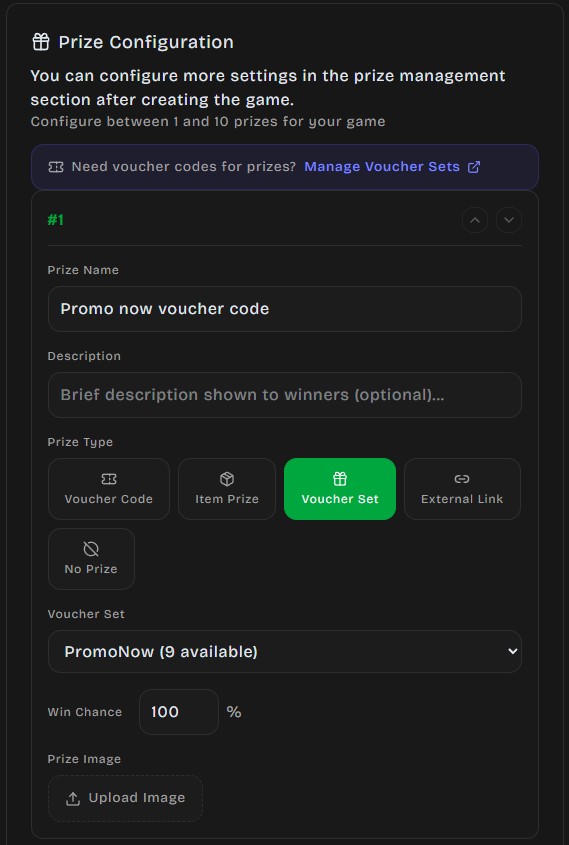
Example: How to set up a voucher code prize in the game:
Example: How to set up an item prize in the game:
Prize Slot Fields
Section titled “Prize Slot Fields”| Field | Description | Required |
|---|---|---|
| Name | Display name shown to the player (max 50 chars) | Yes |
| Description | Additional details (max 200 chars) | No |
| Type | One of the 6 prize types above | Yes |
| Win Chance (%) | Probability of winning this slot (1–100%) | Yes |
| Total quantity | Campaign-wide win cap (leave empty for unlimited; max 1,000,000). Not shown for No Prize. | No |
| Daily limit | Max wins per org calendar day (resets at midnight in your org timezone; leave empty for unlimited). Not for No Prize. | No |
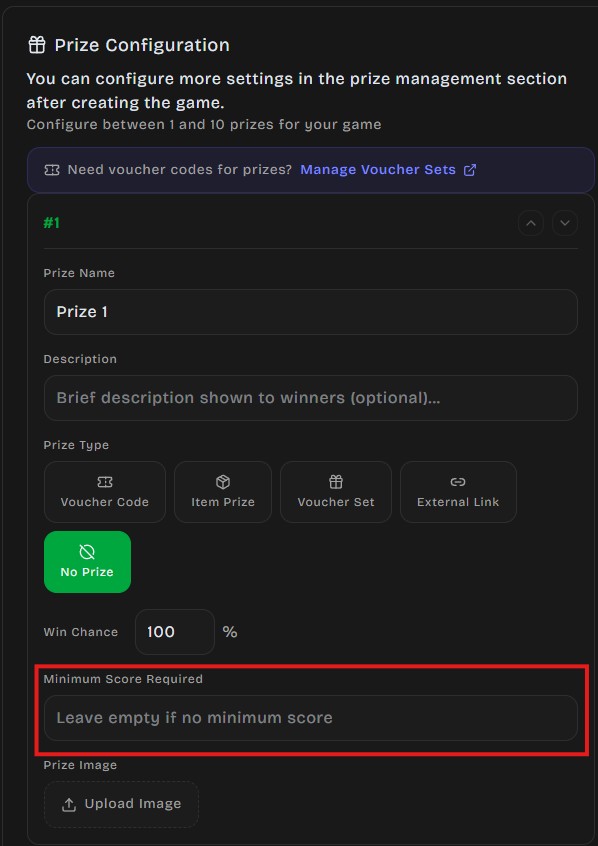
| Min Score | Minimum score required to be eligible | No |
| Voucher Set | Which set to pull codes from (voucher set type only) | Conditional |
| External URL | Redemption link (external link type only) | Conditional |
| Image | Custom prize image (max 10 MB, resized to 256×256) | No |
Display Order
Section titled “Display Order”The order you arrange prizes in the editor directly controls how they appear in the game (e.g., wheel segments, grid cells). Use the Move Up/Down buttons to arrange them. Display order does not affect win probability — only the chance percentage matters for odds.
Probability Rules
Section titled “Probability Rules”All prize chances across a game must total 100% or less.
Validation Rules
Section titled “Validation Rules”- Each slot must have a chance greater than 0%
- The sum of all slots cannot exceed 100%
- DailyPlay validates both in the editor and server-side before saving
When the total isn’t valid, the editor shows an inline warning and blocks you from continuing until it’s fixed.
Example: Spin the Wheel (8 slots)
Section titled “Example: Spin the Wheel (8 slots)”| Slot | Prize | Type | Chance | Total | Daily limit |
|---|---|---|---|---|---|
| 1 | $50 Gift Card | Voucher Set | 5% | 10 | 2 |
| 2 | 20% Off | Voucher Set | 10% | 50 | Unlimited |
| 3 | 10% Off | Voucher | 15% | Unlimited | Unlimited |
| 4 | Try Again | No Prize | 20% | — | — |
| 5 | Free Shipping | Voucher | 10% | Unlimited | Unlimited |
| 6 | Try Again | No Prize | 15% | — | — |
| 7 | Visit Our Blog | External Link | 15% | Unlimited | Unlimited |
| 8 | Try Again | No Prize | 10% | — | — |
| — | Total | 100% |
Example: Gachapon (6 capsules)
Section titled “Example: Gachapon (6 capsules)”| Capsule | Prize | Type | Chance | Total | Daily limit |
|---|---|---|---|---|---|
| Gold | $50 Voucher | Voucher Set | 2% | 10 | 1 |
| Silver | $20 Voucher | Voucher Set | 8% | 50 | 5 |
| Bronze | $10 Voucher | Voucher Set | 20% | 100 | Unlimited |
| Blue | 10% Off | Voucher | 30% | Unlimited | Unlimited |
| Green | 5% Off | Voucher | 25% | Unlimited | Unlimited |
| Gray | Try Again | No Prize | 15% | — | — |
Minimum Score Requirements
Section titled “Minimum Score Requirements”For games that combine skill with luck, you can set a minimum score per prize slot. Players must achieve at least that score before the prize becomes eligible in the draw.
How it works:
- Player finishes the game with a score
- Server filters prizes — only those where
min_score ≤ player's scoreare included - Weighted random draw occurs among eligible prizes only
Example:
| Prize | Chance | Min Score |
|---|---|---|
| Grand Prize | 5% | 1000 |
| Runner Up | 15% | 500 |
| Consolation | 30% | 0 |
| Try Again | 50% | 0 |
A player scoring 750 is eligible for Runner Up, Consolation, and Try Again — but not Grand Prize.
Highest Tier Only
Section titled “Highest Tier Only”For games that support minimum scores, a Highest Tier Only toggle appears at the top of the prize editor. When enabled, a player draws only from the highest score tier they qualify for, instead of from every eligible tier combined.
- Off (default): All prizes with
min_score ≤ player's scoreare pooled together for the draw. - On: Only the prizes in the single highest tier the player unlocked are eligible — lower tiers are excluded.
Use this when you want top performers to compete only for the best rewards, rather than diluting their odds with consolation prizes.

Quantity and Inventory
Section titled “Quantity and Inventory”Every prize type except No Prize has a Prize limits section in the editor with two optional caps and two read-only counters.
| Field | Description |
|---|---|
| Total quantity | Campaign-wide maximum wins. Leave empty for unlimited (max 1,000,000). |
| Daily limit | Maximum wins per org calendar day. Resets at midnight in your organization timezone. Leave empty for unlimited. |
| Remaining | Read-only remaining / total when a total cap is set. |
| Remaining today | Read-only remaining today / daily limit when a daily limit is set. |
Validation Rules
Section titled “Validation Rules”- Each limit must be a positive integer when set, or empty for unlimited
- Daily limit cannot exceed Total quantity when both are set
- Limits apply to all winnable prize types (Voucher Set, Voucher, Item, External Link, Custom Voucher) — not No Prize
Limited Quantity (Total)
Section titled “Limited Quantity (Total)”Set a total quantity for high-value or finite-inventory prizes:
remaining_quantitydecrements each time the prize is won- When it reaches 0, the prize is excluded from future draws until you raise the cap
- Remaining prizes’ probabilities auto-adjust proportionally
Daily Limit
Section titled “Daily Limit”Set a daily limit to cap how many times a prize can be won in a single org day:
- Wins are counted from midnight to midnight in your organization’s timezone
- When the daily cap is reached, the prize is skipped for the rest of that day
- The counter resets automatically at the next org midnight — total inventory is unchanged
- Useful for pacing flash campaigns or protecting fulfillment capacity
Unlimited Prizes
Section titled “Unlimited Prizes”Leave both fields empty for prizes you can always fulfill:
- Digital codes, voucher sets with large inventories, external links
- No inventory or daily tracking needed
What Happens When a Cap Is Reached
Section titled “What Happens When a Cap Is Reached”- The capped prize is skipped during the draw (total depleted or daily limit hit)
- The system redistributes probability among remaining eligible prizes
- If all prizes are ineligible, the game returns no prize
- A prize blocked by its daily limit becomes eligible again after org midnight if total inventory remains
Active / Inactive Prizes
Section titled “Active / Inactive Prizes”Each prize has an is_active flag:
- Active — Included in draws, shown with a green badge in the dashboard
- Inactive — Excluded from draws, shown with a gray badge
Use this to temporarily disable a prize without deleting it (e.g., pause a promotion, swap prizes mid-campaign).
How the Draw Works
Section titled “How the Draw Works”DailyPlay uses a server-side cryptographic draw — prize selection cannot be manipulated from the frontend:
- Game calls the draw endpoint with the game ID
- Server fetches all active, eligible prizes (inventory, daily limit, and score checks)
- Weighted random selection picks a winner based on chance percentages
- A signed token (HMAC-SHA256) is generated containing the result
- Token is valid for 30 minutes
- When the player claims, the server verifies the token signature before awarding
Claim Processing by Type
Section titled “Claim Processing by Type”| Prize Type | What happens on claim |
|---|---|
| Voucher Set | Next available code assigned, voucher marked claimed |
| Voucher | Fixed code string returned to player |
| Item | Prize name displayed, player fills claim form |
| External Link | URL returned, player redirected to external redemption |
| Custom Voucher | Webhook sent to your provider, returned code shown to player |
| No Prize | “Try again” message shown |
Connection Events
Section titled “Connection Events”Every prize claim triggers outbound integrations if configured:
- Zapier, Braze, Mailchimp, HubSpot, Salesforce, Segment, or custom webhooks
- Event payload includes: game ID, player UUID, score, prize name, prize type, voucher code
Learn more in Connections.
Prizes Dashboard
Section titled “Prizes Dashboard”Access from Organization → Prizes to monitor all prize activity.
Stats Cards
Section titled “Stats Cards”| Metric | Description |
|---|---|
| Total Prizes | All configured prize slots |
| Active Prizes | Slots currently eligible for draws |
| Total Wins | Prizes awarded all-time |
| Wins Today | Prizes awarded in the last 24 hours |
| Vouchers Awarded | Voucher codes distributed |
Per-Game Breakdown
Section titled “Per-Game Breakdown”Each game shows:
- Number of prize slots configured
- Total chance percentage (green if 100%, red if over)
- Collapsible table with all prizes: name, type, chance %, remaining quantity, remaining today (when set), active status
- Quick edit link to the game editor
Best Practices
Section titled “Best Practices”Probability Balance
Section titled “Probability Balance”Recommended distribution for player engagement:
| Tier | Chance Range | Purpose |
|---|---|---|
| High-value | 2–10% | Creates excitement and aspiration |
| Medium | 15–30% | Keeps players feeling rewarded |
| Low-value | 25–40% | Frequent small wins |
| No prize | 20–40% | Creates anticipation for retry |
Visual Appeal
Section titled “Visual Appeal”- Upload custom images for each prize — players see them in the game UI
- High-value prizes with compelling images drive more engagement
- Images are resized to 256×256px automatically
Testing Before Launch
Section titled “Testing Before Launch”- Play the game multiple times in preview mode
- Verify all prize types display correctly (codes, links, names)
- Check that voucher set prizes actually deliver a code
- Confirm total and daily limits decrement properly (check Remaining and Remaining today)
- Test with scores below and above min_score thresholds (if used)
Troubleshooting
Section titled “Troubleshooting”Player won but no code displayed
Section titled “Player won but no code displayed”- Check that the linked voucher set still has
availablecodes - Verify the set hasn’t expired
- The prize may have hit its total or daily limit — check Remaining and Remaining today in the editor
Probabilities seem wrong
Section titled “Probabilities seem wrong”- Verify totals equal 100% in the editor
- Small sample sizes will naturally appear skewed — test with 50+ plays
- If some prizes are depleted or hit their daily cap, remaining prizes effectively have higher chances
Prize not showing in game
Section titled “Prize not showing in game”- Confirm the prize is active (not inactive/disabled)
- Check that Remaining isn’t 0 and Remaining today isn’t 0 (if a daily limit is set)
- Ensure the game is published (not in draft mode)
- If using min_score, verify the player’s score meets the threshold
“Token expired” on claim
Section titled ““Token expired” on claim”The draw token is valid for 30 minutes. If a player waits too long between seeing the result and claiming, the token expires. This is rare in normal gameplay.
Next Steps
Section titled “Next Steps”- Set up Voucher Sets → to supply codes for your prizes
- Share your game → once prizes are configured